




Jasmine Birtles
Your money-making expert. Financial journalist, TV and radio personality.



 Annie
30th Dec 2025
Annie
30th Dec 2025
E-ink tablets have exploded in popularity in recent years. They are a great tool for people who want to take notes on-the-go, read books, and stay focused instead of distracted by their constant phone or desktop notifications. We checked out the best e-ink tablets to help you choose the one that’s right for you.
E-ink tablets have a different screen to your phone, tablet or laptop. They reflect light with a special technology rather than emanate light, which makes it much easier on the eyes. Some e-ink readers have a backlight so they can be used in darker conditions; without a backlight you will need an external light source to see them in the dark or low light conditions.
E-ink tablets feel different, too. Instead of a smooth surface, they have a more paper-like feel. This makes them much better to write on with a stylus, as there is added friction to make it feel like you’re writing on paper.
There are different e-ink tablets for different purposes. Some have a very specific purpose, like e-readers for ebooks, while others are more generalised.
The first digital notepad on the market, ReMarkable is recognised as a leader in e-ink tablets. They are designed to be distraction-free digital notepads. This means you can sketch, draw, handwrite or type your notes and save them to the cloud for retrieving on the ReMarkable app on your phone or computer. It keeps you focused and stops notifications such as emails from causing distractions, while keeping you digitally connected to access your notes and illustrations on your devices later on.
They have two key models: the ReMarkable Paper Pro and the ReMarkable Paper Pro Move.
 The ReMarkable Paper Pro starts from £559 and is an 11″ colour e-ink screen. It is perfect for people who want to work on-the-go without distractions, take meeting notes while staying organised and focused, or reading documents.
It’s ideal for students and professionals who need a way to manage their notes and documents, including being able to annotate PDFs, draw illustrations with colour, and write notes using the stylus or additional keyboard. It’s light to carry and fits in any bag (but you should have a cover to protect the screen when not in use). We have a full review of it here.
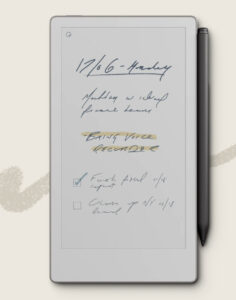 The new e-ink tablet from ReMarkable, this has all the benefits of the larger ReMarkable but fits into a 6″ palm-sized device. This makes it really ideal for people who need to take quick notes on the go or want to sketch ideas without being distracted. Our full review is here.
Boox has been quietly taking over a larger share of the market in recent years for one huge reason: it’s the first company to offer a huge range of e-ink devices that run on Android. This means that, instead of closed platforms like other devices, you can access most apps that run on Android, from email and social media to document and productivity apps. Many avid readers like Boox because they can have Kindle, Kobo, Libby, Hoopla, BorrowBox and many other library and ebook and audiobook apps all on one e-ink device.
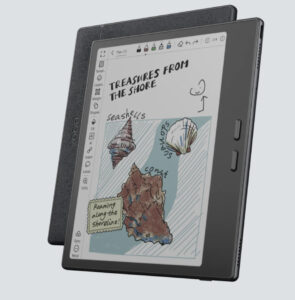 The Go 7 Boox series of tablets is popular with a huge range of users, from professionals to students to avid readers. The Go 7 Color Gen 2 is a 7″ screen which makes it easy to hold, fit in any bag, and offers a huge range of apps for work and play.
The colour screen is ideal for anyone taking notes, drawing sketches, or highlighting documents or books. It also has physical buttons on the side which can be used for things like page turns when reading documents – a feature that has been phased out of a lot of tablets recently, but one many users are demanding return because it adds to the ease and comfort of use.
The screen is responsive with minimal ghosting, which is a slight leftover vision of a previous page – this happens on all e-ink screens when they refresh. Some refresh faster than others, which reduces the ghosting appearance. Boox is responsive and fast.
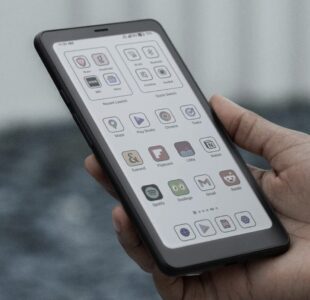 The Boox Palma 2 Pro is designed mostly for those who want to take notes on the go or read books and documents. It’s a 6″ screen, which makes it palm-sized and easy to hold with one hand; there are no physical side buttons like on the Go 7 Color. It runs on Android 15 with 128GB ROM/8GB RAM and Octa-core CPU which makes it super responsive.
The ability to add a data-only SIM means you can stay connected wherever you go, even without WiFi, too. It’s £379.99 on Amazon ($379.99 on the Boox website), but if you don’t want colour you can pick up the Boox Palma 2 for £282.20.
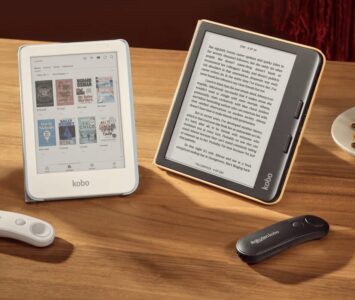
Kobo is a leading competitor of Kindle, in that it is an e-ink reader that serves one core purpose: reading ebooks and accessing audiobooks. The major difference, for UK users, is that Kobo lets you connect your library card and app, to borrow and read free books from your library on the same device.
There are a few options to choose from. The Kobo Clara is the most basic and smallest screen, the Kobo Libra Colour is a bit larger and has a colour screen, and the Kobo Elipsa is the largest.
Kobo Clara starts at £129.99 and comes in black and white or colour, the Libra is colour, and the Elipsa is black and white. The Clara and Libra are for ebook reading, while the larger Elipsa is ideal for people who need to read and annotate business documents or books for studying, as well as take and organise notes like a digital notepad.
The Libra Colour is the favourite of the options for the Magpie team. The colour is pastel but clear, and it is a nice touch to be able to see book covers in the library in colour and to annotate texts with different colours, too. If you want to use a stylus you’ll need to purchase it separately, though.
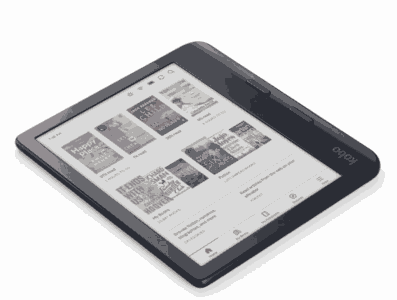 The Libra Colour is 7″ compared to the Clara 6″, and it also includes physical buttons on the side unlike the Clara. This means you can hold in one hand and press buttons to turn the page instead of swiping. The addition of connecting your library card is a huge bonus – especially since Kindle recently expanded their exclusivity clause for authors in Kindle Unlimited to allow them to also include their books in libraries. This means you can access authors who are exclusive in Kindle Unlimited (which is a paid subscription) for free via your library on your Kobo.
The Kobo Plus subscription is either £8.99 a month for unlimited ebooks OR audiobook streams, or £11.99 a month for combined unlimited ebook and audiobooks in the Kobo Plus library, which offers brilliant value for money. You can also try it out for free for 30 days first.
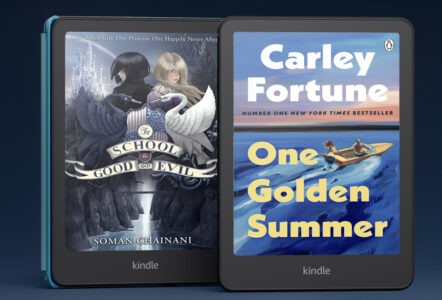
When you hear ‘ebook’ you probably think ‘Kindle’. Much like we use ‘hoover’ instead of ‘vacuum cleaner’, the brand name has become synonymous with ebooks. However, as the market widens, there are other options – like all those mentioned above – which could be more suitable depending on your needs.
There are several Kindle options, such as the Kindle Paperwhite, Kindle Colorsoft, the Kindle basic, and the Kindle Scribe. It is the only e-ink device series that has a dedicated kids option, too. Some models are black and white only, some have colour options.
Kindle lets you purchase ebooks singularly or you can choose Kindle Unlimited for £11.99 a month, which gives access to thousands of exclusive books. This is because authors that enrol in Kindle Unlimited agree not to give their book away or sell it on any other platform than Kindle, which means only Kindle users can access them.
The Kindle Paperwhite is the most popular device. It includes a backlight, unlike the Kindle basic, which means you can read it in all light conditions including in the dark. It’s easy to hold and doesn’t have physical page-turn buttons, so it looks sleek and feels balanced in your hand.
The newest Kindle on the block, this is similar to the Paperwhite but uses colour e-ink technology to add colour to the screen. This upgrade from black and white screens is most suitable to people who annotate their documents or ebooks a lot, or who read graphic novels.
The Kindle Scribe is the largest e-ink device in the range, with a 10.2″ screen. It is like the Kobo Elipsa, designed as a crossover tablet for people who are serious note takers and document annotators, whether for school, work, or hobby.
Your money-making expert. Financial journalist, TV and radio personality.